Difference between Chatbots, AI Chatbots, and AI Agents

Share this blog:

60 Second Summary
A customer messages you: "My payment failed yesterday. Can you retry it and email me the invoice?"
Simple enough, right? Now ask yourself: can a chatbot handle that? Can an AI chatbot handle that? Can an AI agent handle that?
The answer is different for each one. And most businesses find that out only after they've already built the wrong thing.
Everyone throws around "chatbot" like it means one thing. It doesn't.
There's a scripted chatbot that follows rules, an AI chatbot that understands what you're saying, and an AI agent that goes ahead and gets the work done: three different technologies, three different price tags, three different outcomes.
Get this choice wrong, and you're looking at a clunky customer experience, a rebuild six months down the line, and an automation project that never quite pays for itself.
By the end of this blog, you'll know exactly which one your business needs, and why.
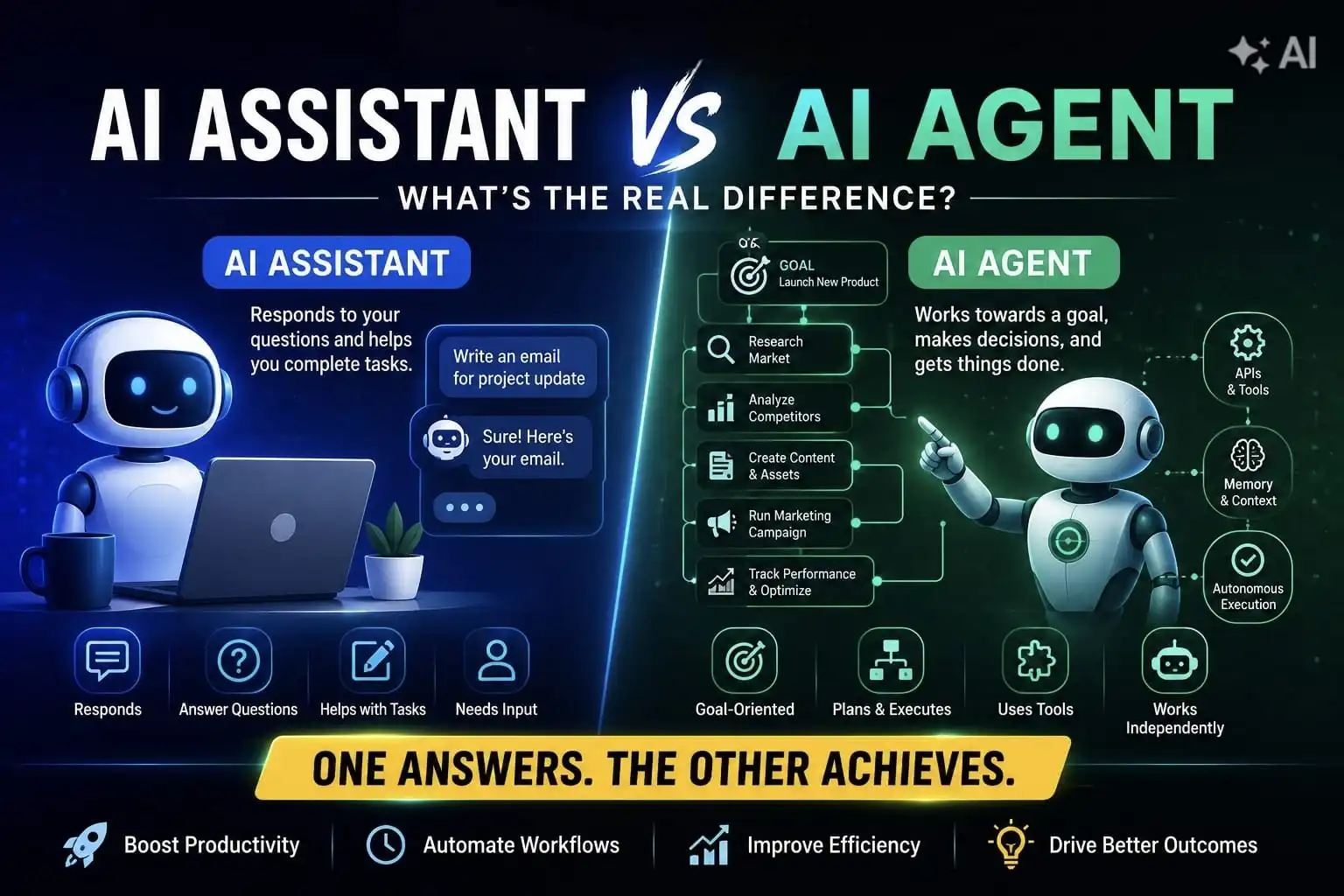
While terms like Chatbot, AI chatbots, and AI agents are often used interchangeably, both differ in terms of their capabilities. Knowing the differences between the three is important to find the optimal solution for your specific requirements.
Basis of Comparison | Chatbot | AI Chatbot | AI Agent |
How it understands | Keyword matching | Intent and context (NLP, LLMs) | Intent, context and goals |
Memory | None; every interaction is treated as first | Limited memory often requires users to repeat context or preferences | Persistent, goal oriented |
Multi step tasks | Cannot handle anything beyond a single scripted interaction | Cannot independently complete multi step processes | Can handle end-to-end, multi-step workflows autonomously |
Learning | Doesn't learn | Improves with more data | Adapts based on outcomes |
Level of Autonomy | None | Requires continuous user input for every step | Can work independently and initiate actions |
Tool and API use | None | Limited, sometimes none with external systems | Connects with enterprise systems, databases and applications to retrieve data and perform actions (CRM, ERP, APIs) |
Reasoning | None | Understands intent | Plans and sequences multi-step actions |
Typical Outcome | Delivers a scripted, prewritten response | Delivers information or recommendations | Delivers completed work or executes business processes |
Human Supervision | Not needed | Occasional | Built-in checkpoints, especially early on |
Cost | Low | Moderate to high | Highest |
Best For | FAQs, simple bookings | Customer support, HR queries, sales assistance | Workflow automation, CRM/ERP updates, approvals |
Typical ROI timeline | Immediate, but limited upside | Faster, weeks to months | Longer but compounds over time |
Example | "Reset password" returns the same prewritten steps every time, regardless of phrasing | Explains how to submit a leave request | Submits the leave request, updates the HR system, and completes the workflow (if authorized) |
A traditional chatbot works off decision trees and keyword matching. Type "reset password," it matches that phrase to a pre-written script, and it replies with the same steps every time, regardless of who's asking or how they phrase it.
That's fine for a restaurant taking table bookings or a bank's FAQ page answering, "what are your working hours?" It's cheap, predictable, and quick to set up. But ask it something the script didn't anticipate, and it breaks; no memory, no reasoning, no understanding of context.
Limitation? A chatbot doesn't learn. It can't tell that "I forgot my password" and "I can't log in" mean the same thing, because it's matching words, not meaning.
Here are some applications of chatbots, and it differs across every department, not just customer support -
In the customer service industry, chatbots are simplifying customer service by answering FAQs instantly, handling billing and account questions, walking customers through basic troubleshooting, and providing order status updates without pulling in a human agent. If something is genuinely complex, then the chatbot will hand over the queries to a human agent.
Chatbots engage website visitors, ask qualifying questions to figure out if someone's actually ready to buy, answer pricing and product questions, and book demos or consultations directly into the rep's calendar. This means a lot of manual back and forth that used to eat into a sales team's day now happens before a human joins the conversation.
Beyond lead capture, chatbots run interactive campaigns, personalize content based on how someone's responding, and collect feedback that would otherwise need a separate survey.
This feedback loop is what lets the marketing team refine campaigns while they're still alive, not months back.
Internally, chatbots handle password resets, answer HR questions about leave and benefits, guide new hires through onboarding, and point employees to the right internal document instead of someone filing a ticket and waiting two days for a reply.
Chatbots recommend products based on browsing behavior, answer detailed product questions, help you with checkout when someone's stuck, track orders, and walk customers through returns without a support agent getting involved.
An AI chatbot fixes exactly that problem. It runs on large language models and NLP, so it understands intent rather than matching keywords. It knows that "I forgot my password" and "I can't get into my account" are the same request, even though the words barely overlap.
That's the real shift. A chatbot needs you to phrase things exactly right. An AI chatbot figures out what you meant, holds context across a conversation, and remembers what you told it two messages ago.
Businesses use AI chatbots for customer support, internal HR queries, knowledge search across company documents, and sales assistance. A bank might deploy one to explain loan eligibility. A hospital might use one to answer patient questions about appointment prep. And an AI chatbot isn't necessarily powered by just one model either.
Enterprise chatbots often combine GPT or Claude with retrieval-augmented generation (RAG), a vector database, and internal APIs, so answers come from your actual company data instead of a generic guess.
Limitation? An AI chatbot still just talks. It can explain how to retry a failed payment. It can't retry it.
Conversational AI chatbots have diverse use cases across many industries, which are as given below -
In the retail industry, conversational AI tools provide interactive experiences by enhancing the customer experience. From AI-powered product recommendations to virtual try-ons and demos, these chatbots understand buyer needs and provide customized recommendations.
Thanks to Generative AI technology and personalization marketing, these AI-powered chatbots offer some real advantages for companies, such as increasing revenue by 5-15% and levelling up ROI by 10 to 30%.
This is possible mainly because these conversational AI interfaces have made the buyer's journey so personalized by not just handling complex queries but delivering customer recommendations in the form of personalized clothing options and styling tips.
In healthcare, these AI-powered assistants are helping patients schedule appointments, check the provider's availability, book a slot, and walk the patient through current symptoms, relevant history, and medications.
For example, Florence is a personal nurse AI chatbot that runs on Facebook Messenger and Skype. Tell it what medicine you're asking, how often and at what time, and it messages you a reminder every time a dose is due, useful for older patients who might otherwise forget. It also tracks metrics such as weight, mood, or menstrual cycle to help users stay on top of personal goals.
Banks and fintech companies are using AI chatbots to handle transactions, provide financial planning advice, and send individual account information.
This shows conversational AI tools are transforming the way banks interact with customers. Banking chatbots simplifies KYC onboarding process for customers.
Within a single conversation, the AI chatbot will walk you through the document uploads and ID verification process. Everything happens across a single chat, which results in quicker onboarding.
For example, Remitly, the global money transfer company, is a good example of this in banking. Since most transfers sent through Remitly go toward urgent needs, customers can't afford to wait around when something goes wrong.
So, Remitly built an AI-powered virtual support assistant that helps with tasks like cancelling a transaction or tracking a transfer status. The assistant resolves issues four times faster, cutting average support time by 75%, while matching the satisfaction ratings of human agents. Only 3% of customers even bother switching to a human.
Energy companies are now getting more work done through AI chatbots. Billing queries can now be handled 24*7 like resolving a payment issue or giving energy-saving recommendations to customers so they can save more dollars.
A properly built hotel chatbot works off your own data instead of a script. Train it on your FAQs, your reservation system, past guest interactions, and your loyalty program, and it stops sounding like a canned bot and starts sounding like it actually works there. No generic answers, no guests repeating themselves to a bot that doesn't know their reservation.
Think of it as a multitasking employee. Reservations, policy questions, and upsell prompts rarely need a human, so the chatbot picks up that routine volume while your support and sales teams stay free for the cases that need a person. AI hospitality bots are built around exactly that division of labor.
Recently, we helped a leading hospitality group automate guest support across their website and WhatsApp, handling everything from bookings and in-room dining to over 3,000 types of complaints, using NLU-powered chatbots built on our own GPT-3 engine.
The result?
Every week, legal teams describe the same starting point on these calls: mid-sized enterprises, large corporations, and compliance departments all sitting on the same low-hanging use case before they touch anything more advanced.
That first tier is a legal chatbot working as an assistant.
At this level, the chatbot handles simple, unstructured work: sharpening a draft, summarizing a document, or answering a quick research question. None of that needs a specialized legal AI model.
A general-purpose model like GPT or Claude handles it well on its own, since the task is single-step and doesn't need the chatbot to reason across a workflow or touch your systems.
For example, we partnered with DigiLawyer to make legal guidance more accessible to everyday users, including those more comfortable communicating in regional languages.
The AI chatbot uses a verified legal knowledge base to answer questions in plain language, handle follow-ups, and hand over complex cases to a human when needed.
Available 24/7 across 7+ regional languages, the virtual lawyer was live within a month and now handles around 200 new queries a day.
An AI agent goes past holding a conversation and actually gets things done. Instead of waiting for a question and producing an answer, it takes a goal and works out how to reach it, using tools, APIs, and systems along the way.
If an AI chatbot is your assistant answering questions, an AI agent is closer to a chief of staff, someone who takes the objective, plans the steps, makes the calls, and reports back once it's done.
That shift from answering to acting is also why agentic AI is attracting so much enterprise attention.
Gartner’s best-case projection estimates that agentic AI could account for approximately 30% of enterprise application software revenue by 2035, more than $450 billion, compared with about 2% in 2025.
Limitation? The brain behind every agent is still an LLM, so if the underlying model misunderstands the task, the agent can plan confidently in the wrong direction.
That's why human checkpoints matter, especially early on, and why agents still need monitoring even after they're live.
Agents span across wide range of use cases for industries, for planning multi-step workflows and executing complex workflows without human oversight.
1. Sales and Marketing Automation: Sales and marketing teams spend a lot of hours on administrative work that never moves revenue.
AI agents change that math by taking over parts of the job that don't need a human judgement call such as
2. Finance and Accounting: Finance teams and contract accountants are constantly trying to speed up payments and close books faster. Still, incorrect invoices and missing payments are exactly time-consuming issues that need manual intervention to fix.
3. Autonomous Customer Support: Traditional customer service leans on human agents to handle repetitive queries, and that's exactly where long wait times, inconsistent answers, high operational costs, and scaling problems during peak demand all come from.
4. AI agents fix things differently than a chatbot would. Instead of just answering from a script, an agent pulls from customer profiles, knowledge bases, response templates, and even regulatory factors, all of it at once to resolve the query. That cuts down resolution time on escalated cases and compounds over time into higher customer satisfaction.
5. Travel and Hospitality: A chatbot on a hotel website answers generic questions about check-in times. An agent turns the same into a 24*7 website.
It asks for information about the traveller's destination, budget, and the kind of trips they offer (relaxation, culture, business). It offers a day-to-day itinerary with dining and spa suggestions.
Since the agent is connected to the property's actual data and local market details, it can handle objections and guide someone towards booking directly instead of bouncing to a third-party site.
While it naturally works on upsells such as a room upgrade or a spa package along the way.
6. Cloud and FinOps: AI agents watch cloud usage continuously, catching cost spikes and tracing them back to the responsible team or workload the moment they happen, instead of waiting for someone to notice a bloated bill.
They go further than reporting, too, identifying idle resources and oversized instances, then rightsizing or shutting them down within set guardrails, while forecasting models predict where spend is headed before the month closes.
That's the shift we built into Costimizer for one client: a real-time, multi-cloud view of spend and usage, with an agent handling detection and remediation underneath it, cutting cloud costs by up to 30% and freeing DevOps from manual reporting.
Whether you need an AI chatbot, a chatbot, or an AI agent, it primarily depends on the complexity of your needs and whether you prioritize simplicity, speed, or deep automation.
Choose a chatbot if your use case is a simple FAQ, your workflows are static, and your budget is tight. Think order status lookups or store hours.
Choose an AI chatbot if you need to handle varied customer questions, support internal teams like HR, or act as a knowledge assistant across departments like banking, healthcare, or sales.
Choose an AI agent if the goal is workflow automation that spans multiple systems, like updating a CRM, running procurement approvals, or handling multi-step finance and legal processes where the outcome matters more than the conversation.
That's exactly the kind of question worth answering before you build anything. BigOhTech's AI consultants look at your actual workflow first and recommend the architecture that gives you the best return, not the flashiest one.
Ready to pick the right AI for your business? Two things are clear.
First, if you're serious about automation, whether that's a chatbot answering FAQs, an AI chatbot handling real conversations, or an AI agent executing entire workflows, you need to match the technology to the problem.
Not the trend, not what a competitor built, the actual problem.
Second, we're obviously not neutral on who should build it for you.
But that bias comes from what 15+ years of chatbot development and 100+ multi-agent systems deployed looks like in practice:
If you're still working out whether your business needs a Chatbot, an AI chatbot, or an AI agent, book a free AI consultation with our team, and we'll map it against your actual workflow, not a generic framework.
You can also explore our AI Agent Development Services or AI Chatbot Development Services directly if you already know which side of the fence, you're on.
A traditional chatbot follows predefined rules and decision trees, so it works best for FAQs and simple workflows. An AI chatbot understands intent, remembers context, and generates natural responses using AI models, making conversations feel much more human.
AI chatbots can perform basic actions like checking order status or creating tickets through integrations. However, AI agents go further by planning multi-step workflows, using multiple tools, and adapting based on outcomes.
Not always, rule based chatbots work without LLMs, while AI chatbots typically use large language models to understand natural language and generate context-aware responses.
Yes, but not on its own. Most enterprises combine ChatGPT with company knowledge bases, RAG, APIs, authentication, and security controls to deliver business-specific responses.
AI chatbots typically deliver faster ROI by reducing support costs and handling repetitive queries. AI agents usually require a larger investment but generate higher long-term value by automating entire business processes.
Skip chatbots if your goal isn't just answering questions but executing complex workflows across systems. In those cases, an AI agent is often a better long-term fit because it can plan, act, and adapt autonomously.
An AI agent can go beyond answering questions; it can analyze information, make decisions, interact with different business systems, and complete multi-step tasks with minimal human intervention to achieve a specific goal.
A chatbot is designed to answer customer questions, share information, and guide users through predefined conversations. It's ideal for handling FAQs, customer support, and routine queries quickly and efficiently.
AI agents are best suited for scenarios that require intelligent decision-making and workflow automation. Whether it's processing claims, managing inventory, or handling customer requests across systems, they can execute tasks with little manual effort.
Yes, AI chatbots can evolve from conversational interfaces to more autonomous AI agents. These AI chatbots can be integrated with advanced capabilities such as reasoning, planning, and tool usage.
Both aim to improve efficiency, customer experience, and scalability, just from different angles. AI chatbots streamline communication by making sure customers and employees get accurate answers fast. At the same time, AI agents go further, automating the actual work behind those conversations so more gets done without a human stepping in.