In most cases, enterprise integration problems start with a “quick script”. A developer is asked to connect two systems, with no documentation, no owner, and no plan.
And before long, that temporary script becomes permanent in the organization’s code. Because of this, edge cases pile up, debugging becomes difficult, and soon no one wants to touch the original code.
The consequences? Data silos, teams make decisions on incomplete information and an organization-wide system breakdown when one system gets an update.
A well-defined system integration strategy solves this problem. That’s why we have put together a complete guide on business system integration strategy that covers why it matters, common types, and which architecture suits your enterprise best.
60-Second Summary
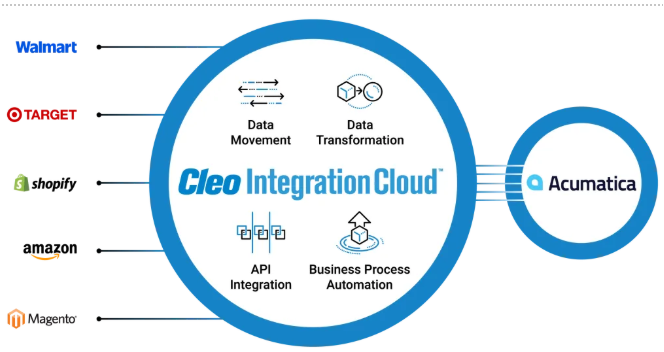
System integration strategy is the process of connecting all components used by any startup or enterprise, such as:
into a unified system. The strategic integration of all the different subsets of a company improves functionality, data flow, and operational efficiency.
How did this happen?
Here are the reasons why business system integration matters for your organization:
1. Real-Time Synchronization of Data
organizations collect terabytes to petabytes of data every year. Handling the data pools and driving valuable insight from them is not a simple task.
That’s where the system integration strategy comes in; that Synchronizes all platforms in real-time. When one tool records an action, it triggers a response in another.
2. Unified Customer View
A single customer interacts with your business multiple times, across multiple platforms, such as Google Analytics, Shopify, and Zendesk. The problem? You have data in different formats and stored in different places, and none of the teams gets a full picture.
Enterprise integration pulls all of this information into one unified, real-time view, enabling smarter decisions, more personalized experiences, and full compliance with data privacy regulations.
3. Faster Flow of Data
In enterprises without a business integration system, business processes don’t flow; they stop at every department boundary. For example, the sales team closes a deal and manually emails this information to the operations team, which manually enters this data.
As a result, the whole process takes days or even weeks. Enterprise integration replaces manual work with automated processes, hence reducing duplication of data and chances of error.
4. Connecting Legacy and Modern System
Startups and enterprises run on-premises as well as modern cloud-native tools.
The reason? Replacing the legacy system could be costly, risky, and disruptive.
Integration solves this by adding a layer of APIs, which expose the data from legacy to modern system, as result, the two systems communicate seamlessly, and support IT modernization.
Ultimately, this transformation connects multiple IT systems directly. The result is fully integrated business systems that drive efficiency, speed up information flow, and lower operating expenses.
4 Common Methods used by enterprises to deploy system integration
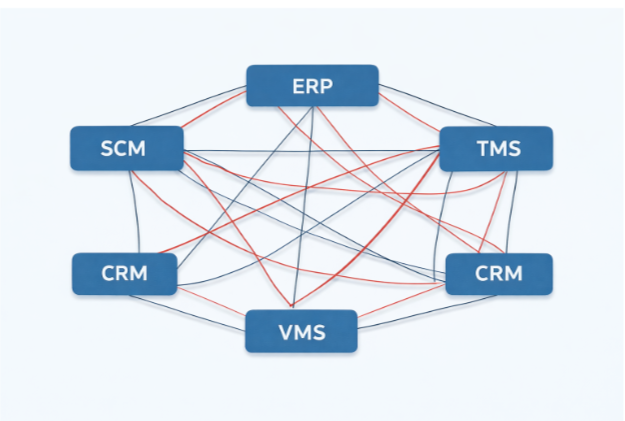
Before modern architectures emerged, enterprises relied on a monolithic system integration strategy to connect systems directly. That has been replaced by the Point-to-Point model.
This architecture pattern connects one system to other systems of the organization directly. With one system connected to the other, data is extracted, modified, and then sent to another system. This model can be realized via APIs, webhooks, or custom code.
Pros: Simple deployment when the number of systems is 2 to 5.
Cons: This model is hard to scale. When the number of systems increases, systems become hard to manage.
2. Hub-and-spoke model
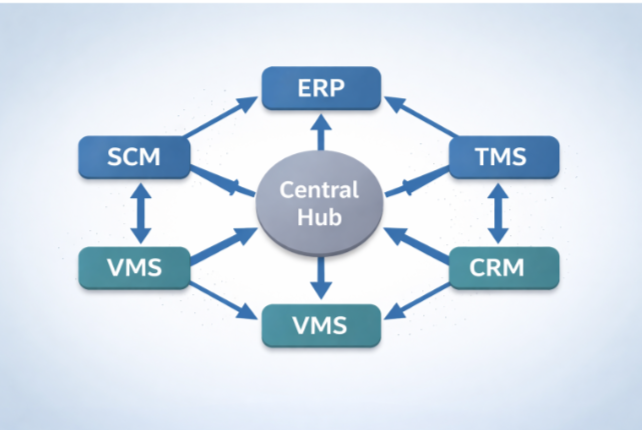
In this architecture model, all the systems are connected to a central hub. All the systems are connected to the hub, which receives, translates, and sends the data to the intended system. Hence, the system doesn’t communicate directly; they rely on the hub.
Pro: This model comes with the benefit of scalability and simplicity. If the enterprise needs to install more systems, it can be done by connecting it to the hub simply.
Con: the whole model depends on a single central engine. In case of system failure or downtime, this can be a bottleneck situation for the business.
3. IPaaS (Integration Platform as a Service)
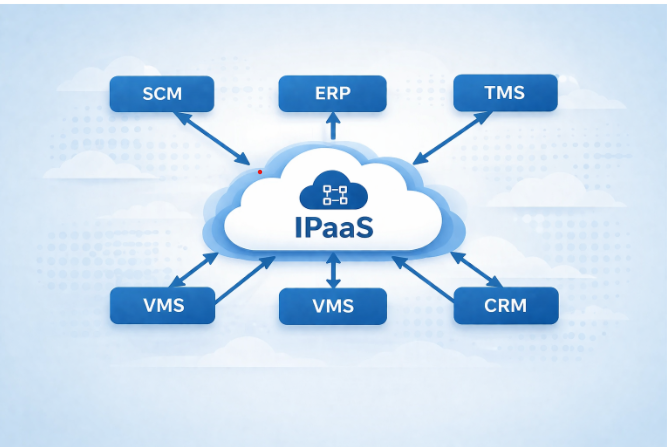
This is a cloud-native platform that acts as a central hub, which integrates your applications and data across different environments. This architecture is suitable for an enterprise that
Pro: IPaaS is either no-code or low-code, which makes this model less reliant on the tech specialist
Con: iPaaS’ services are provided by an outside vendor, which increases the dependency on the vendor. This model also comes with security concerns. 4. Enterprise Service Bus (ESB)
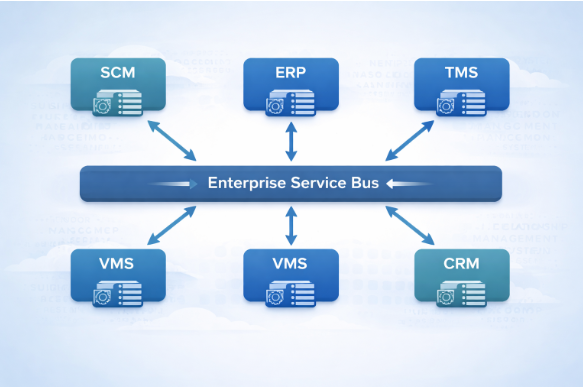
An Enterprise Service Bus (ESB) is essentially a "bus-based" architecture designed to help many different types of computer systems within an organization talk to each other easily and efficiently. In this model, each system has its own engine, and ESB acts as the bridge that allows these separate systems to communicate seamlessly.
Pro: This model makes your applications independent, so they don't have to rely on each other's specific technical requirements. This means you can change or upgrade one system without breaking everything else.
Con: different systems are plugged into this one central middleware, making even a small change or upgrade create a bottleneck. A bug fix for one connection might accidentally break another, so you have to be extremely careful and perform deep testing every time you touch the ESB.
Here are the primary challenges businesses face:
1. High Costs and Long Timelines
Conventional integration solutions often demand high investments, with implementation timelines that can span from weeks to months. Beyond the initial setup, companies also face ongoing expenses related to tool licensing and continuous maintenance.
2. The "Skills Gap" and Talent Shortage
Even with the right tools, you need people who know how to use them. The sources point out a significant shortage of specialized technical expertise in the market. A robust system integration strategy requires professionals who understand B2B industry standards and can manage the complex lifecycle of an integration, which is a rare skill set to find.
3. Brittle and Unscalable Connections
Enterprises that adopt "point-to-point" integrations, which connect two tools directly. While simple at first, these connections often become brittle and break whenever a system is updated or changed. This creates isolated systems that lead to duplicate data, inconsistent customer experiences, and wasted effort.
4. Technical Complexity Beyond APIs
A common misconception is that APIs (Application Programming Interfaces) are a complete solution. While they are a vital foundation, they do not automatically handle the issues that come with integration. Challenges here include:
5. Maintenance and Support
System integration strategy requires continuous maintenance and support, especially when systems are modified. Without a proactive strategy, integrations often fail during system updates, leading to unpredictable expenses, rather than predictable, scalable operational capability.
As enterprises grow, their systems become distributed; different teams own their own applications, often sending data in formats others cannot accept. This creates miscommunication, broken operations, and inconsistency. APIs and automation, working together, are the solution.
APIs are a set of rules and protocols that define how different software, such as CRM and HRM systems, communicate with one another. For example, When Shopify wants to connect to FedEx, it presents its API key, FedEx verifies it against authorized partners, and the request is either accepted or denied. Simple, secure, and instant.
Why this matters:
Where APIs create the connections, automation puts them to work. Automation integration connects all subsystems hardware, software, and networks into a single cohesive unit, allowing data to move between systems without manual intervention.
Amazon, for instance, uses ERP automation to unify Seller Central, FBA warehouses, inventory, and repricing tools into one real-time platform, eliminating manual work across orders, pricing, and fulfilment.
Why this matters:
Being a leading AI/ML development company, BigOhTech has In-house specialists who can help you with business system integration, AI integration and automating mundane business processes.
Our team uses advanced algorithms to understand your business patterns, to predict analytics that boost your business decision-making.
We have worked with Costimizer, a cloud cost optimization platform, to build an AI agent system. The company’s engineers had to monitor and optimize the cost manually; the task was repetitive and time-consuming. How did BigOhTech help?
Results? Cloud spends dropped by 20–30% within the first quarter. DevOps teams became 5x more productive, finance teams hit 95% budget forecast accuracy, and automated policies saved hundreds of engineering hours per month, directly cutting operational overhead.
Here is how system integration directly impacts business growth and operational margins:
This is why APIs are valuable for business system integration:
Yes. Delayed insights, inaccurate forecasting, and slow execution prevent businesses from capturing demand. Competitors with integrated systems capitalize on opportunities while others lag behind.
AI reduces dependency on manual tasks at each step and legacy constraints:
Enterprises should treat integration as a strategic growth enabler, not IT expense. This is how your business should approach integration systems:
Yes. Enterprise system integration reduces friction between systems and teams, making it easier to test, launch, and scale new initiatives. This directly accelerates innovation cycles compared to siloed organizations.
AI enhances integration by enabling predictive insights and intelligent automation. This allows organizations to anticipate trends and act proactively, rather than reacting after competitors.
Types | Defination | Example |
Data Integration | Combining data from different platforms and tools into a single dashboard, for a unified and structured view. | Uniting Data from CRM, sales platform, and marketing tools to view the whole consumer journey in one place. |
Application Integration | Links and enables all the apps an enterprise uses to work together in real-time. | A hospital connects its EHR, insurance verification, pharmacy and billing system to cut the admit time of patient. |
Process Integration | This integrates and automates various business processes (operating on different apps) to work together. | Integration of order management, inventory, warehouse, and customer notification to place an order |
Cloud Integrtion | Integrating the on-premises system with cloud-based applications and servers, for flexibility and scalability. | On-premises EPR system integrated with cloud–based business tools, such as CRM and dashboard, payroll. |
B2B Integrtion | This will connect and integrate systems and processes between two or more organizations, for communicating and exchanging data. | A retailer connecting its internal system directly with its supplier’s system (both using different software, data and processes). |