Top 9 Free Agile Project Management Tools That Grow Your Business
Share this blog:

60-Second Summary
Agile methodologies in product development facilitate collaboration and efficiency. Feedback is taken after every sprint in order to develop the most suitable, relevant as well as lucrative product as per the business's uniqueness and requirements. In this blog, we will have a look at the top free Agile project management tools that enhance coordination and ease of development.
Any strategy or method is a successful one if you are using the right tools. Similarly, Agile methodology for product development is optimized with certain tools that help teams to better implement sprint planning, tackle real-time changes, and enhance collaboration.
These tools include features such as Kanban boards or swim lanes, burndown charts, real-time collaboration, messaging features, and point management for user stories.
Some of the most popular and free Agile project management tools are:
Asana is an Agile project management platform that boosts team collaboration and accelerates the development process. Despite being loaded with functionalities, this tool is easy to use and manage.

Asana is used all across the globe by teams of different natures and sizes. The platform could be made as simple or as comprehensive as the project and team require it to be.
More than 100 well-established third-party applications, including Microsoft Teams, Slack, Adobe Creative Cloud, Dropbox, Clockwise, Google Drive, MS Office 365, Outlook, Zapier, Power BI, Tableau, Google Calendar, Zoom, and Salesforce, are integrated with Asana across 190 countries.
Businesses can opt for the free version or the paid version that starts from $10.99 /month.
Facilitates complete project management, from communication, activity logs, and file storage to meeting deadlines and achieving milestones, under the free plan. etc. Management of simple projects with less than 15 users, is possible through Asana’s free plan.
Allows the development of scalable project dashboards updated in real-time for a comprehensive overview of projects.
Offers file sharing in different, multiple formats such as PDFs, JPGs, Google Docs,
Email inboxes can get chaotic and cluttered with multiple notifications.
Tasks can only be assigned to one user; there can be collaborators, but the task goes to a single user.
Performs better in full-screen modes than mobile devices.
Jira is a name that is common in any technical environment. Thus, it is one of the most widely used free agile project management tools. A team of 3 to 30,000 can rely on this tool for effective management of the development process, from strategizing, and shipping to releasing. This tool has been built prioritizing Agile principles and the requirements of the software development cycles and teams.

Workflows are streamlined with Scrum and Kanban boards and visual roadmaps and multiple charts make Agile reporting easier. Code branches can be accessed in real time facilitating bug-tracking and version control.
The free plan of the tool also offers automation for one project. This platform works well for small agile projects or teams.
The paid version starts at $7.50 /month.
Offers complete agile capabilities with sprint, backlog management, and Kanban taking center stage.
A free plan that is suitable for small teams.
If the team has more than 10 members, the paid version must be selected.
Only the paid versions offer project roles and capacity planning.
May be less useful for companies that also need to target different departments like marketing and sales
This is a cloud-based, free agile project management tool. From collaborative task settings, and communication boosting features to project updates and status notifications, Click-up allows the agile development process to be seamless.

Along with offering greater visibility into the project, this tool is highly configurable and comes with advanced real-time reporting powers. It has a user-friendly and intuitive UI and offers more than 15 views.
Offers flexible time-tracking features.
Allows to customize dashboards. High-level overviews could be constructed for each job as well as the entire project.
Gives the freedom to choose the most suitable organizational structure for teams belonging to different sectors.
Users require deep training to leverage the tool. From setting up, and onboarding to the usage, a user would be required to pay a lot of attention.
This is also one of the most popular free agile project management tools. MeisterTask facilitates task management as well as boosts collaboration. From the management of software sprints to calendars, this tool adapts to the workflow of diverse teams through its flexible project boards.
The interfaces of this platform are appealing and user-friendly, and the functionality is simple with ease of integration.
The paid version starts from €8.25 /month.
Work progress, fresh tasks added, etc., can be viewed on the platform along with a calendar of upcoming due dates.
Ease of use.
Multiple versions to suit the needs of diverse businesses.
A process calendar that offers a comprehensive view of a project’s productivity is not included.
Budget monitoring and cost control have not been given enough importance or dedicated tools.
One of the most widely used free agile project management tools, Miro is a collaborative digital whiteboard that has more than 1,000 templates. These templates include mind maps, Gantt charts, wireframes, Kanban boards, flowcharts, etc.

The virtual platform is suitable for hybrid work and has strong supporting resources. One of the many features of this tool is its interactive, visual workboards. Built-in video conferencing further facilitates project management.
Paid plans give access to guests and visitors such as clients and stakeholders for greater collaboration.
This tool has integrations with names such as Miro has integrations with tools including Zoom, Azure, Figma, Asana, Microsoft Teams, Jira, Slack, etc., with some integrations limited to paid plans only, starting at $8/user/month (billed annually).
This tool is trusted by around 50 million global users and used by big names across the world, such as TransUnion, HP, Upwork, Cisco, Qlik, and Atkins.
The paid version starts from $10/user/month.
Offers versatility and can be used for brainstorming to project management.
Provides strong visual elements.
Can be really helpful to track the progress of Kanban boards, sprints, and user stories.
Expensive for larger teams.
Limited offline capabilities.
Trello is a user-friendly free agile project management tool. It has a simple design and prioritizes user practicality. With one of the shortest learning curves and ease-to-use interfaces, this tool offers high levels of automation. Further, with the use of Butler, Trello’s automation bot, users can build rule-based triggers and suitable actions.
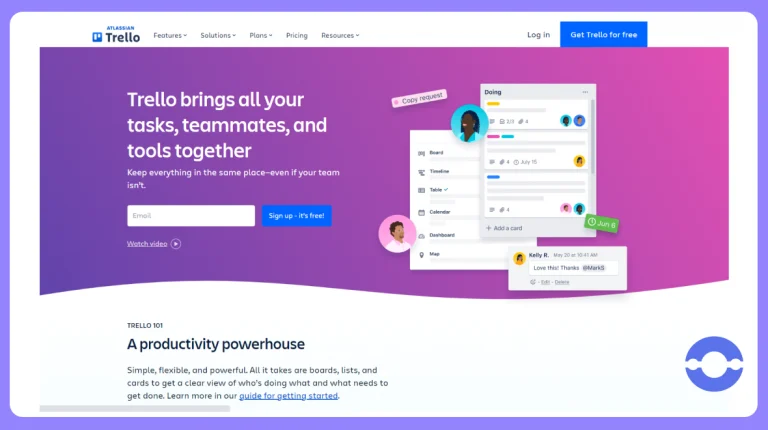
This tool offers power-ups for file management, analytics, reporting, collaboration, communication, etc.
Trello’s integrations include Slack, Jira, Miro, SupportBee, Make, OneLogin, Jell, Paperform, and Salesforce. Additionally, it has an integration with Zapier that could be used to connect to thousands of extra apps.
The paid version starts at $5.00 /month.
Managers are given the option to view assignees, task descriptions, comments, etc.
Additional project views priced similarly to competitors
Does not offer reporting and analytics out of the box
Users might face difficulty in creating roadmaps or tying tasks to subtasks
One of the best free agile project management tools, Wrike is popular amongst and suitable for teams of five or more. It is a flexible solution that offers multiple add-ons to diverse organizations. These add-ons include proofing tools to boost creativity and entire resource management extension.

Kanban board, task management, and file-sharing are offered by the free plan to help users get started. The mobile app also makes the tool portable, with an adjustable user interface to cater to different needs.
The paid version starts from $9.80/user/month.
2 GB storage and integration with some of the most popular cloud services offered by the free plan.
Multiple add-ons and plans to cater to diverse needs.
The free plan includes limited active tasks and excludes the Gantt chart.
For advanced integrations and automation, users would require a Business plan.
Odoo is just not a free agile project management tool, it is a widely used ERP system that includes accounting, inventory, HR, billing, CRM, warehousing, website, and e-commerce platforms, etc. It is an open-source tool that has a free as well as a paid version with multiple features.

The project management app of this platform allows agile teams to view and track tasks as per the Kanban style. This includes a progress bar and an animated status for project tracking. Additionally, the tool offers Gantt charts, graphs, issues, etc.
Licensed under GPL v3, this tool provides multiple integration options with other apps, such as WhatsApp, Google Maps, eBay, and Amazon.com.
Businesses could get pricing on request for the paid version of this tool.
The platform allows businesses to set up, plan, add timelines, and analyze the team’s performance. This resolves client tickets more easily.
All the organizational data can be stored in one place for better coordination.
Requires significant training learning time and effort.
An expert group of professionals is required to customize this tool, online lessors are not sufficient to set up an optimized workflow.
Added to the list of best free agile project management tools, GitLab is a website known for hosting open-source projects in Git repositories. However, companies use it as an open-source web app that facilitates product development and project management.
Businesses could make payment for hosting plans or host it themselves. Additionally, with the community edition, companies can only run the open-source components. This edition is given under the MIT license and offers scrum and kanban, epics, documentation, charts, sprint planning, etc., to support agile projects.

The interface of this platform is intuitive, user-friendly, and consistent. From task assigning to sprint planning, all can be done within this tool. Moreover, as the platform further grows, more features deemed suitable and as per users' requests, would be added.
The platform comes with good UI, facilitates project management, and code review as well as the APIs can be easily used in projects.
Offers source control management, project scheduling, CI/CD, etc. Integration with tools such as Jenkins, TeamCity, etc., to facilitate workflows and offer automation.
Strong community support.
Provides less open-source support in comparison to GitHub. Additionally, the support for cross-platform also lacks.
The in-browser IDE experience requires improvement.
With so many options available in the marketplace for free agile project management tools, businesses often get confused as to which tool is the most suitable for their project.
Thus, we list down some considerations to make before choosing the best free agile project management tool.
The tools should have the following features:
Besides these features, a business should also check:
Thus, the free agile project management tools facilitate seamless agile product development, fostering greater cooperation and coordination through the process. These tools should be chosen as per project requirements as well as the features offered.
Delivery tracks and tasks, roadmap maintenance, sprint reviews, as well as integration capabilities, ease of learning and use, pricing, etc., are some features and factors that businesses should consider before choosing the most suitable free agile project management tool.
Jira, ClickUp, and Trello are among the most popular free Agile project management tools for teams of different sizes.
Look for sprint planning, Kanban boards, reporting, roadmap management, integrations, and collaboration features.
Jira offers a free plan suitable for small Agile teams.
Yes. Trello provides Kanban-style boards and automation features that support Agile workflows
An Agile project management tool helps teams plan, track, and manage projects using Agile methodologies. These tools support sprint planning, task management, collaboration, and progress tracking.
Yes. Many free Agile project management tools offer essential features such as Kanban boards, task tracking, collaboration, and reporting, making them suitable for startups and small businesses.
Consider factors such as team size, ease of use, integrations, reporting capabilities, pricing, and project requirements before selecting a tool.
Asana, Trello, and Jira are popular choices for small teams because they offer free plans with essential features such as task management, collaboration, and workflow tracking.
No. While GitLab is widely used by software development teams, it also provides project management features such as sprint planning, Kanban boards, documentation, and workflow management that can support broader Agile initiatives.
Odoo is a strong option for businesses that need additional capabilities beyond project management, as it also includes features for CRM, accounting, inventory management, HR, billing, and e-commerce.


•
Sr. Technical Writer•
Articles